
The Front-End Checklist is an exhaustive list of all elements you need to have / to test before launching your site / page HTML to production.
It is based on Front-End developers' years of experience, with the additions coming from some other open-source checklists.
Si ça peut intéresser certains.


Sites de sous-titres :
- https://www.opensubtitles.org
- https://subscene.com
- http://www.subtitleseeker.com
- https://www.subsynchro.com
Via https://www.dsfc.net/logiciel-libre/multimedia/trouver-fichier-srt-sous-titres-film-vo/
Je rajoute :
- http://fr.tvsubtitles.net pour les séries principalement
- http://www.addic7ed.com séries aussi
Et enfin https://github.com/abhishek-vinjamoori/SubtitleExtractor comme outil pour télécharger des subs directement via les sites de streaming.
Bien joué le con :0
Le brevet décrit un mécanisme où le jeu détermine un objet pouvant intéresser le joueur. Ensuite, le jeu cherche un joueur possédant cet objet et fait en sorte qu'il se rencontre au cours d'un match. Ensuite, l'algorithme vérifie si le joueur a acheté l'objet « intéressant ». Si ce n'est pas le cas, alors le profil est mis à jour. Soit. Mais dans le cas contraire, le joueur ayant acheté l'objet est placé dans un match (ou aura des suggestions de vidéos ou de matchs à voir) dans lesquels l'objet acheté est efficace.
Comment lutter efficacement contre la mérule ? Un nouveau type de traitement écologique venu du Nord de l'Europe arrive en France.
Perso, j'aurais dit de tout bruler, enfin bon.

Lassée de subir au quotidien les jets de bave et les remarques acides d’un alien Xénomorphe, une astronaute du vaisseau spatial USCSS Nostromo s’est finalement décidée à porter plainte contre la méchante créature pour harcèlement sexuel.

Sur une musique de Patrick Bruel et des paroles de Pierre Gattaz, Frédéric Fromet chante le contrôle des bran... pardon, des chômeurs.
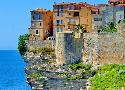
We’ll take the Mediterranean island as a whole for this instalment of Crime and the City. Corsica has a criminal reputation to rival nearby Sicily’s. With a population of 333,000 that swells considerably in the summer months, Corsica is technically French territory, but last June, when Emmanuel Macron won a landslide victory on the mainland he didn’t win a single seat on the entire island. Corsica instead elected three parliamentarians from the autonomist Pe a Corsica (“For Corsica”) alliance. The renewed call for independence, in the countryside as much as in the island’s two major cities Ajaccio (pop. 66,000) and Bastia (pop. 43,000), was resounding. The far-right candidate Marine Le Pen touched down briefly, but was effectively chased off the island with her bodyguards getting beaten up by the Nationalists from Ghjuventu Indipendentista (Youth for Independence). She should have known better—her equally right-wing father Jean Marie was staunchly against any negotiation with the “separatists” and ran into the same sort of trouble in his day.
Via HN.


The last few years mark the rise of the so called flat-file CMS - content management systems that store data organized in files and folders rather than in a database like MySQL. Simplicity, speed and enhanced security are just some of the advantages that flat-file CMS have compared to established CMS like WordPress or Drupal that appear as overkills for most projects nowadays.
Bon, reste à voir si à jour ou pas, mais bon départ.
Were you able to clone it? Unless you have quite a lot of memory (both RAM and storage) git was killed, ran out of memory, or you had to reboot. Why is this? It is a perfectly formed repo made of only 12 objects.
Here is a step-by-step quick guide on building the perfect Windows 10 v1709 reference image using MDT 8443 and Windows ADK 10 v1709.
Version 1.0 (1000010) - Ajoutée le 2017-10-18
La 1.0.

Civ 3 gratuit pour 2 jours.
J'avais mis celle-ci en ligne si besoin aussi, si ça peut t'aider : https://river.libox.fr
Ayant récemment migré de WordPress vers Ghost, j'ai souhaité utiliser une autre solution que Disqus pour la gestion des commentaires sur le blog, de préférence self-hosted. Je me suis donc tourné vers Isso, un système de gestion de commentaires open-source permettant de gérer plusieurs sites.
Drush is a command line shell and Unix scripting interface for Drupal. Drush core ships with lots of useful commands for interacting with code like modules/themes/profiles. Similarly, it runs update.php, executes sql queries and DB migrations, and misc utilities like run cron or clear cache. Drush can be extended by 3rd party commandfiles.
De par mon utilisation personnelle et le cadre professionnel, je côtoie assez rarement Drupal, et c’est souvent un problème en plus. Malgré tout, et ce via un outil très pratique, j’ai pu accéder et pouvoir dépanner un client sans avoir à mettre à mal la sécurité de ses comptes administrateurs sur le CMS.
L'outil :